Disclosure: Some of the links on this website are affiliate links. It's possible for me to receive a commission at no extra cost to you.
Quick answer: If a robot vacuum smells only during the 10–30 seconds it auto-empties, the fan is pushing odor out of the dry-debris system. Replace or empty the dock’s dust container, inspect the robot bin for damp pet hair or food, clean the filter and emptying ports, and make sure no moisture reached the bag. This is different from a dirty-water-tank smell.
Why the smell appears only during auto-emptying
An auto-empty dock moves a large volume of air through the robot bin, duct, dust bag or canister, and exhaust filter. That airflow turns a faint odor inside the closed dock into a noticeable puff across the room.
Common causes:
- A dust bag held pet hair or food crumbs for several weeks.
- The robot picked up damp debris or crossed a wet area.
- Moisture reached the bag after mopping.
- A clump is stuck in the robot’s evacuation port or dock duct.
- The robot filter or dock filter is overdue for service.
First, tell dry-dock odor from dirty-water odor
| When it smells | More likely source |
|---|---|
| Only during the loud emptying burst | Dust bag, canister, filter, or air duct |
| When you open or pour out a wastewater tank | Dirty water reservoir |
| While the robot is actively mopping | Damp mop pad or stale water |
| Continuously around a self-washing dock | Wash tray, drain, dirty tank, or damp pad |
| Hot plastic/electrical smell at any time | Stop, unplug, and seek service |
The 10-minute auto-empty odor reset
1. Stop auto-emptying and unplug the dock. Let the fan stop completely before opening covers or reaching near a duct.
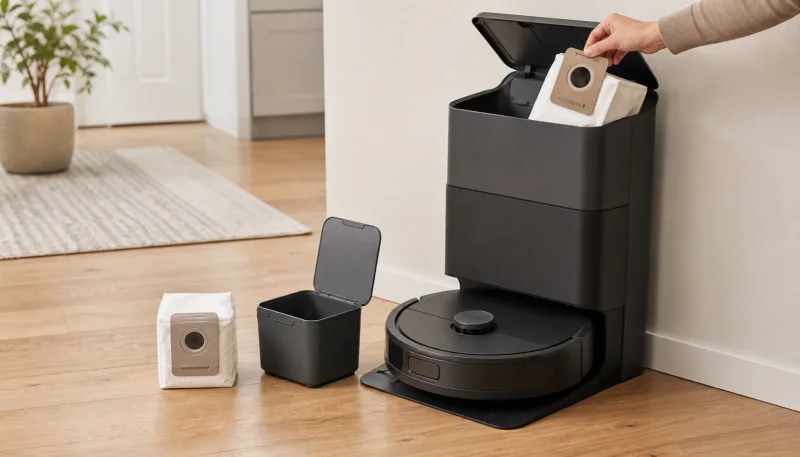
2. Replace the dust bag. Do not wait for a full alert if the bag smells. Pull it out by the sealing handle/card so debris stays contained. On a bagless Shark or Roborock canister, empty it outdoors if possible.
3. Inspect the old bag for moisture. A damp bag should be discarded immediately. iRobot warns that moisture in an evacuation bag creates an environment for mold and unpleasant odor.
4. Empty the robot bin by hand. Look for damp pet hair, food, or compacted dust that failed to transfer.
5. Check both evacuation ports. With power off, clear visible material from the robot outlet and dock inlet. Use the model’s access panel if the manual provides one; do not pour cleaner or push a wet cloth deep into a fixed duct.
6. Service the filters. Tap-clean or replace non-washable filters. Rinse only filters that the manual marks washable, then dry them for the full stated time before reinstalling.
7. Wipe accessible dry surfaces. Use a dry microfiber cloth inside the bag chamber and around accessible ports. If moisture entered, follow the manufacturer’s support instructions.
8. Install a fresh bag and test. Run a short vacuum-only job on a dry floor, then trigger one emptying cycle.
Fixes by dock type
| Dock type | What to do |
|---|---|
| Bagged auto-empty dock | Replace the bag, dry the chamber, inspect ports and filters |
| Bagless auto-empty dock | Empty canister, clean approved washable parts, dry completely |
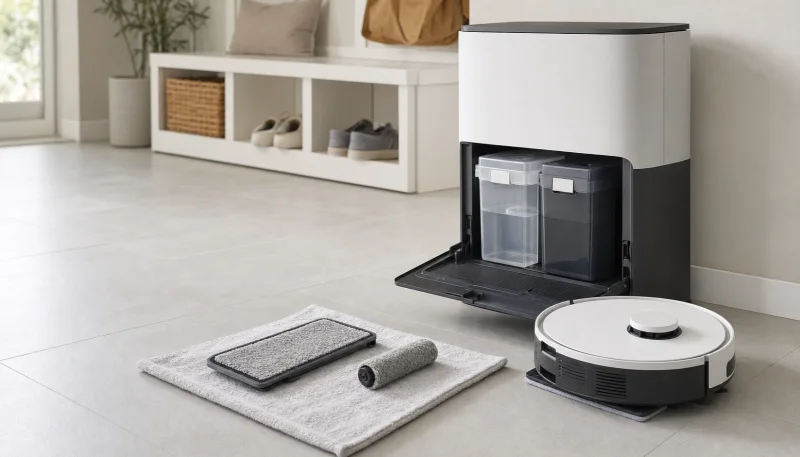
| Self-washing hybrid dock | Service both systems separately: dust bag/duct and wastewater tank/tray |
| Plumbed dock | Check dry bag/duct plus the wastewater filter and drain if odor is constant |
Brand notes
Roborock: Roborock suggests replacing disposable dock bags about every seven weeks, depending on use. Odor, moisture, or pest activity is a reason to replace sooner. Model-matched Roborock dock bags are cheap enough to keep a spare box.
Roomba: Pull the bag by its card to seal it. If a Combo robot sends water into the Clean Base bag, discard the wet bag and dry accessible moisture in the base before reuse. Keep model-matched iRobot bags on hand so a smelly bag never has to wait.
Dreame and Eufy: A self-washing dock contains both a dust bag and a dirty water tank. Time the odor carefully so you clean the correct side. Replacement Dreame bags and filter kits and Eufy bags and filters are model-specific, so match the exact dock.
Shark: Many Shark self-empty bases are bagless. Empty the base bin and maintain its filters rather than searching for a disposable bag — PowerDetect base filters are the part that holds the smell. Some newer NeverTouch Pro bases also wash mops, so they can have a separate wet odor source.
Keep the smell from returning
- Do not vacuum wet spills, damp pet food, or fresh vomit/urine residue.
- Let a mopped floor dry before a vacuum-only pass.
- Empty the robot bin manually after an accidental wet pickup.
- Replace bags early in pet-heavy homes.
- Do not sprinkle carpet deodorizer, baking soda, essential oil, or fragrance into the dock; fine powder and oil can damage filters or motors.
- Keep a spare set of the exact bags and filters for the model.
When the smell means stop
A dusty, stale, or pet-like odor is a maintenance problem. A sharp electrical, melting-plastic, or burning-rubber smell is not. Stop the robot, unplug the dock, move it away from flammable material, and contact the manufacturer if the odor returns after an obvious brush jam is removed.
Frequently Asked Questions
Why does my robot vacuum smell when emptying?
The auto-empty fan is pushing air through an old dust bag or canister, damp debris, the robot filter, and the evacuation duct. Replace or empty the dock container, inspect the robot bin for moisture, clear the ports, and service the filters.
Can a robot vacuum dust bag grow mold?
Yes, if moisture reaches it. Damp pet hair, wet food, a mopping error, or water pulled into the evacuation system can leave a bag wet. Discard a damp bag immediately and follow the manufacturer's instructions for drying accessible base surfaces.
How often should I replace an auto-empty dock bag?
Follow the model's alert and manual, but replace sooner if the bag smells or gets damp. Roborock gives about seven weeks as a general estimate for several docks, while pet hair and food debris may require earlier changes.
Can I spray deodorizer into a robot vacuum dock?
No. Fragrance, oil, and moisture can coat filters, damage motors, or turn fine dust into a clog. Remove the odor source by changing the bag, clearing damp debris, and cleaning only the parts the manual marks serviceable.
Why does my robot vacuum smell burnt when it empties?
Stop and unplug the dock. A burning smell can indicate a blocked fan, overheating motor, electrical fault, or jammed robot brush. Do not continue testing an electrical or melting-plastic odor; contact the manufacturer.